
Quality QRQuality QR
  • Features
  • Use Cases
  • Pricing
  • Docs
  • Blog
Back to Blog
Design

QR Code Size Guide: Minimum Sizes for Every Use Case

What size should your QR code be? Covers minimum print dimensions, scanning distance formulas, and real-world examples for cards, posters, and signage.

January 1, 20264 min readBy Quality QR Team
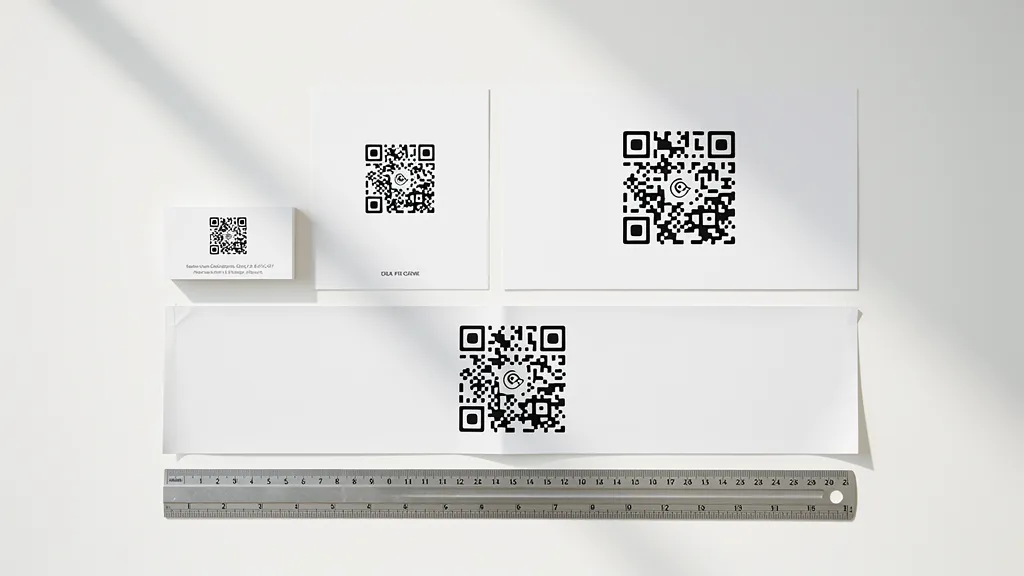
Various printed materials showing correct QR code sizes from business card to poster

On this page

  • The 10:1 Rule
  • Size Recommendations by Use Case
  • Factors Affecting Scannability
  • Testing Your Size

The minimum QR code size follows the 10:1 rule: scanning distance should not exceed 10 times the code width. For business cards, use at least 0.8 inches (2 cm). For posters viewed from 3-4 feet, use at least 2 inches (5 cm). For banners viewed from 6-8 feet, use at least 4 inches (10 cm). Always print a test and scan from the intended distance before final production.

The 10:1 Rule

A good rule of thumb: the scanning distance should be no more than 10 times the width of the QR code. A 1-inch QR code can be scanned from about 10 inches away.

Size Recommendations by Use Case

Business Cards

Minimum: 0.8 inches (2 cm) Recommended: 1 inch (2.5 cm)

Flyers and Brochures

Minimum: 1 inch (2.5 cm) Recommended: 1.2 inches (3 cm)

Posters (viewing distance 3-4 feet)

Minimum: 2 inches (5 cm) Recommended: 3 inches (7.5 cm)

Banners and Signs (viewing distance 6-8 feet)

Minimum: 4 inches (10 cm) Recommended: 6 inches (15 cm)

Billboards

Calculate based on typical viewing distance. For highway billboards, QR codes are often impractical due to viewing distance and speed.

Factors Affecting Scannability

  • Code complexity (more data = denser pattern)
  • Printing quality
  • Contrast
  • Lighting conditions
  • Phone camera quality

Testing Your Size

Always print a test and scan from the intended distance before committing to a full print run.

Generate print-ready QR codes in any size with Quality QR.
Frequently Asked Questions

What is the minimum QR code size for business cards?

The minimum size for business cards is 0.8 inches (2 cm), with 1 inch (2.5 cm) recommended. This ensures reliable scanning from typical business card viewing distance of about 8-10 inches.

How big should a QR code be on a poster?

For posters viewed from 3-4 feet, use at least 2 inches (5 cm), with 3 inches (7.5 cm) recommended. Apply the 10:1 rule: scanning distance should not exceed 10 times the code width.

Why won't my QR code scan?

Common reasons: code is too small for the scanning distance, insufficient contrast between foreground and background, poor print quality, reflective surface, or the code encodes too much data making it too dense.

Are QR codes on billboards effective?

Highway billboards are generally impractical for QR codes due to viewing distance and vehicle speed. QR codes work best where people can stop and scan—pedestrian billboards at eye level may work, but test thoroughly first.

View all FAQs

Related Articles

How to Add a QR Code to Your Business Card (2026 Guide)
Design

How to Add a QR Code to Your Business Card (2026 Guide)

Best practices for adding QR codes to business cards: sizing, placement, what to link to, and mistakes to avoid.

QR Code Design Best Practices for 2026
Design

QR Code Design Best Practices for 2026

Learn how to create beautiful, branded QR codes that get scanned. Tips on colors, logos, and maintaining scannability.

QR Code Generator Cost: 3-Year Total Across 8 Tools
Guides

QR Code Generator Cost: 3-Year Total Across 8 Tools

Marketing pages show monthly prices. The reality is multi-year. Here is the actual 36-month cost across 8 popular QR code generators, with per-code math and a free-tier durability score.

QQT

Written by

Quality QR Team

The Quality QR team brings together experts in QR technology, marketing, and software development. We're passionate about helping businesses create effective QR code strategies.

Ready to get started?

Create your first QR code in seconds. No credit card required.

Create Free QR Code
QR Code Security Best Practices: The Complete 2026 GuideQR Code Scams: How to Spot and Avoid Them in 2026
Quality QRQuality QR

Create beautiful, trackable QR codes with transparent pricing and a free tier that never expires.

Review us on Trustpilot

Product

  • Features
  • Pricing
  • API
  • Demo
  • QR Generator

QR Types

  • Use Cases
  • URL QR Code
  • WiFi QR Code
  • vCard QR Code
  • Email QR Code

Resources

  • Documentation
  • Guides
  • Knowledge Base
  • Alternatives
  • Blog

Company

  • About
  • Privacy Policy
  • Cookie Settings
  • Terms of Service
  • Contact

© 2026 Quality QR. All rights reserved. · Sitemap