QR code scams are on the rise, with parking meter fraud and restaurant overlay attacks being the most common. To protect yourself: always check if a QR code appears to be a sticker placed over another code, preview the URL before opening, verify the domain matches what you expect, and never enter personal information on unfamiliar sites. For businesses, use tamper-evident QR materials and educate customers about your legitimate codes.
The Rise of QR Code Scams
As QR codes have become ubiquitous, from restaurant menus to payment systems, scammers have found new ways to exploit them. The FBI issued warnings about malicious QR codes in 2022, and attacks have only grown more sophisticated since then.
Common QR Code Scam Types
Parking Meter Scams
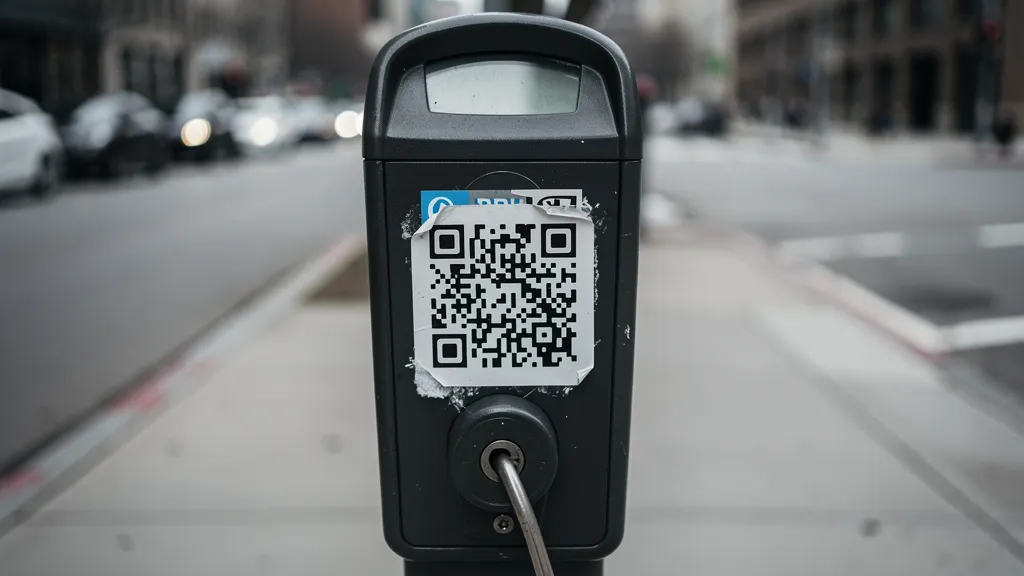
Criminals place fake QR code stickers on parking meters. When scanned, victims are directed to fraudulent payment sites that steal credit card information. Several US cities including Austin, San Antonio, and Houston have reported widespread parking meter QR scams.
How to avoid: Most official parking systems use dedicated apps or well-known payment platforms. If a parking QR code directs you to an unfamiliar site, don't enter payment information. Look for official signage or use the meter's physical payment options.
Restaurant Overlay Attacks
Scammers place malicious QR code stickers over legitimate restaurant menu codes. The fake code redirects to phishing sites that may mimic the restaurant's branding or attempt to install malware.
How to avoid: Check if the QR code appears to be a sticker. Ask staff if the code looks suspicious. If the landing page asks for unexpected information (like payment details for just viewing a menu), close immediately.
Package Delivery Scams
Fake "missed delivery" notices with QR codes claim you need to reschedule a package. The code leads to phishing sites designed to steal personal information or payment details.
How to avoid: Legitimate delivery services like UPS, FedEx, and USPS don't typically use QR codes on missed delivery notices. When in doubt, go directly to the carrier's official website instead of scanning.
Cryptocurrency Scams
QR codes promising free crypto, investment returns, or wallet verification lead to sites that steal wallet credentials or trick victims into sending cryptocurrency to scammer wallets.
How to avoid: Never scan QR codes from unsolicited messages about cryptocurrency. Legitimate crypto platforms don't distribute funds via random QR codes.
Social Engineering via QR
QR codes in emails or text messages claiming to be from banks, employers, or government agencies. These "urgent" messages pressure victims to scan immediately without thinking.
How to avoid: Banks and government agencies rarely (if ever) send QR codes via email or text. Contact the organization directly through their official website or phone number.
How to Verify a QR Code is Safe
Before Scanning
- Check if the code appears to be a sticker placed over another code
- Look for signs of tampering or poor print quality
- Consider the context: does a QR code make sense here?
- Be suspicious of QR codes in unexpected places
After Scanning
- Preview the URL before opening (most phones show this)
- Check that the domain matches what you expect
- Look for HTTPS (the lock icon)
- Be wary if the site immediately asks for personal information
Red Flags
- Urgency: "Scan immediately" or "Limited time"
- Too good to be true: Free money, prizes, or crypto
- Unexpected requests for payment or personal information
- Poor grammar or spelling on the landing page
- URL that doesn't match the expected brand
Protecting Your Business
If you use QR codes for your business, protect your customers:
- Use tamper-evident materials: Stickers that show if they've been lifted
- Place codes in secure locations: Behind counters or under glass
- Regular inspections: Check your QR codes periodically
- Educate customers: Include your domain name near QR codes
- Use branded short URLs: Customers can recognize your domain
- Monitor analytics: Sudden drops might indicate tampering
Why Reputable QR Generators Matter
Using a trusted QR code provider like Quality QR adds layers of protection:
- HTTPS everywhere: All redirects use secure connections
- Abuse monitoring: We scan for malicious destinations
- Branded domains: Your customers recognize your links
- Analytics alerts: Unusual patterns trigger notifications
What to Do If You've Been Scammed
If you entered information on a suspicious site after scanning a QR code:
- Change passwords immediately for any compromised accounts
- Contact your bank if you entered payment information
- Monitor your accounts for unauthorized activity
- Report the scam to the FTC at reportfraud.ftc.gov
- Warn others: report fake QR codes to the business or location
Create secure, trustworthy QR codes with Quality QR, because your customers' safety matters.