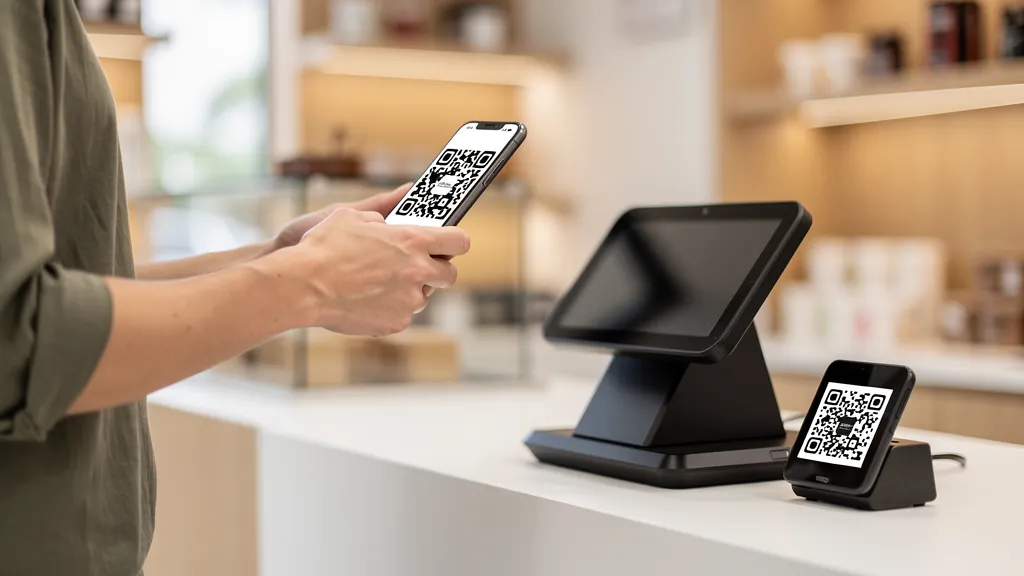
QR code payments work by encoding payment information in a scannable code. Customers scan with their phone camera or payment app to complete transactions. Major platforms include Venmo, Cash App, PayPal, Apple Pay, and Square. For businesses, QR payments reduce hardware costs and speed up transactions, which is especially valuable for small vendors, restaurants, and service providers.
How QR Code Payments Work
There are two main types of QR code payments:
Customer-Presented QR
The customer displays a QR code from their payment app. The merchant scans this code to charge the customer's account. Common with Apple Pay, Google Pay, and retail store apps.
Merchant-Presented QR
The merchant displays a QR code (printed or on screen). The customer scans this to initiate payment. Popular with Venmo, Cash App, PayPal, and small businesses.
Major QR Payment Platforms
Venmo (US)
Venmo's QR codes let customers pay directly from their Venmo balance, linked bank account, or card.
For merchants: Enable Venmo Business Profile for a scannable QR code. 1.9% + $0.10 fee per transaction. Best for: Casual transactions, small businesses, peer-to-peer payments.
Cash App (US)
Cash App's $Cashtag QR codes work similarly to Venmo.
For merchants: Set up Cash App for Business. 2.75% fee per transaction. Best for: Small vendors, tips, informal business.
PayPal (Global)
PayPal QR codes work for both personal and business accounts, with global reach.
For merchants: Access QR code in PayPal Business app. Rates vary by volume. Best for: International payments, established businesses.
Square (Business-Focused)
Square offers QR code payments integrated with their POS system.
For merchants: Generate codes through Square Dashboard. 2.6% + $0.10 per transaction. Best for: Retail, restaurants, service businesses.
Apple Pay & Google Pay
These use customer-presented QR codes that merchants scan.
For merchants: Requires compatible POS system. Best for: Retail environments with existing payment infrastructure.
Alipay & WeChat Pay (China/International)
Dominant in China and growing internationally. Essential for businesses serving Chinese tourists.
For merchants: Apply through Alipay/WeChat merchant programs. Best for: Tourism, international retail.
Setting Up QR Payments for Your Business
Option 1: Payment App QR (Simplest)
Create a business account on Venmo, Cash App, or PayPal. Generate your QR code and display it at your register.
Pros: Free setup, familiar to customers.
Cons: Manual reconciliation, limited features.
Option 2: POS Integration (Professional)
Use Square, Stripe, or similar to generate QR codes integrated with your point-of-sale system.
Pros: Automatic inventory/accounting, professional receipts.
Cons: Hardware/software costs.
Option 3: Custom Payment Page (Flexible)
Create a payment page using Stripe or PayPal and link to it via QR code.
Pros: Full customization, works with any payment processor.
Cons: Requires web development.
QR Payment Security
For Customers
- Only scan QR codes from trusted sources
- Verify the merchant name before confirming payment
- Check that the payment app shows the expected recipient
- Never pay via QR code from random messages or emails
For Merchants
- Use tamper-evident displays for printed QR codes
- Monitor for unusual transactions
- Enable notifications for every payment
- Regularly check that your QR code hasn't been replaced
Benefits for Small Businesses
Lower costs: No expensive card terminal needed. Just print a QR code. Faster transactions: No card swiping or chip reading delays. Easier tips: Customers can add tips directly in the payment app. Touch-free: Hygienic option that many customers prefer.
Important Note
This guide covers accepting payments via QR codes using existing payment platforms. Quality QR helps you create marketing and information QR codes. For payment QR codes specifically, you'll need to use your payment provider's tools (Venmo, Square, PayPal, etc.).
Create marketing QR codes that complement your payment strategy with Quality QR: link to your menu, services, or booking page.